


Plant App - Identifier & Care
3.9278.00 Reviews
App Specs
- Version
- 2.3.5
- Updated On
- License
- Free
- Downloads
- 1,000,000+
- Developer
- HUONG DAO
- Categories
- Education
- Platform
- Android
Screenshots
 Analysis by AppCompare
Using a plant identifier in a shared home is most useful when a mystery leaf turns into a practical question: is this a weed, what might it be, and what should we check before changing how we care for it? I like the idea of having one place to start, especially when several people tend the same pots or garden. The Plant App - Identifier & Care is an education app from HUONG DAO that brings image-based plant identification and care guidance together; I’d treat it as a helpful reference for household decisions, not as an unquestionable authority.
A shared plant mystery, handled together
Picture a familiar scene: one person notices an unfamiliar shoot beside the herbs, another has a phone handy, and a child wants to know whether it is a flower or a weed. A photo can give the household a common starting point for looking it up. That is more useful than everyone searching different phrases online and comparing unrelated results, but it still pays to inspect the whole plant and its surroundings before acting.
For a better identification attempt, I’d photograph a clear leaf or flower in good light, keep the subject in focus, and avoid including several different plants in the same frame. If the first result seems surprising, I would take another picture from a different angle rather than immediately pulling the plant out or changing its care. This simple habit makes an automated suggestion easier to assess and turns the app into a prompt for observation, not just a name generator.
Setting expectations before everyone uses it
A shared phone can make it convenient for family members to check a plant on the spot, but convenience does not mean everyone should treat every result as a final answer. I’d agree on a small household routine: take the photo, read the identification and care guidance, then check whether it fits the plant’s visible features and location. That is especially sensible when the next step could affect a prized houseplant, a garden bed, or a plant someone may touch or eat.
It is also worth deciding who handles follow-up care. If one person uses the app to look up a plant and another waters it later, they can easily work from different assumptions. A quick verbal handoff—what the plant might be and what the guidance suggests—helps prevent a well-meant but unnecessary change. I would not assume that information or reminders created on one person’s device automatically become a shared household schedule; each user should check what they can see and manage on their own device.
Care advice is a starting point, not a household rule
Plant care depends on conditions that a photo alone cannot fully show. Light near a window, the moisture in a pot, the season, and the way a room is heated can all affect what a particular plant needs. I’d use the app’s advice to form a sensible next question—does this soil feel dry, or is this spot much darker than the guidance seems to assume?—rather than following a reminder blindly.
That distinction matters when several people share watering duties. A reminder may be useful as a nudge, but it should not replace checking the soil and the plant itself. If someone watered yesterday, repeating the task simply because another person sees a prompt could do more harm than good. For household use, a quick note on the pot or a shared conversation may be a better record of the last watering than expecting the app to coordinate everyone.
Worth Reading Before You Choose

EA SPORTS FC Mobile 26 Is a Bigger Football Game, but It Takes Time

Flipboard Shows What News Apps Must Do Beyond the Feed

Switching to Android Auto Means Rethinking Your Driving Routine

Google Calendar Makes a Crowded Week Easier to Manage

Ludo King Makes the Most of the Minutes Between Plans

Baby Panda World Brings Quick Play to Modern Phones, but Its Game Library Feels Busy
Age, trust, and sensible boundaries
The app is rated for Everyone, which makes it suitable for general audiences, but an age label is not a substitute for adult judgement about how a child uses a phone or interprets an identification. I’d happily use it as a way to encourage curiosity—asking a young gardener to compare leaf shapes or notice where a plant is growing—while keeping an adult involved in decisions about eating, touching, removing, or treating an unfamiliar plant.
For a potentially irritating, poisonous, or otherwise risky plant, an app result should not be the sole basis for a safety decision. Keep children and pets from sampling unknown leaves, and seek a dependable expert source if the identification affects health or safety. That is not a weakness unique to this app; it is a sensible limit for photo-based identification in general.
Getting to Know the Plant App
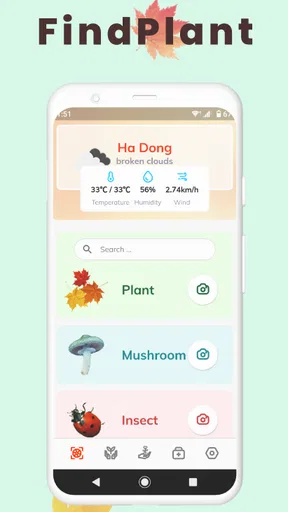
Right off the bat, the Plant App - Identifier & Care charms you with its sleek and user-friendly interface. The app is available for both Android and iOS, so no one’s getting left out. Upon launching the app, you're greeted with a clean layout that's both visually pleasing and incredibly intuitive. It’s almost like the app is saying, "Hey, I'm here to make your life easier!"
Features That Stand Out
Let’s talk about the main attraction: the plant identification feature. It’s as simple as snapping a picture of the plant in question. The app then works its magic, analyzing the photo to provide you with detailed information about the plant species. I mean, it’s like having a green-thumbed detective at your service!
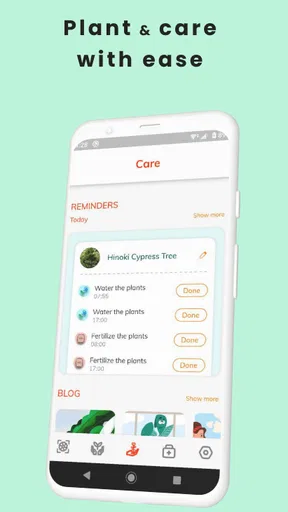
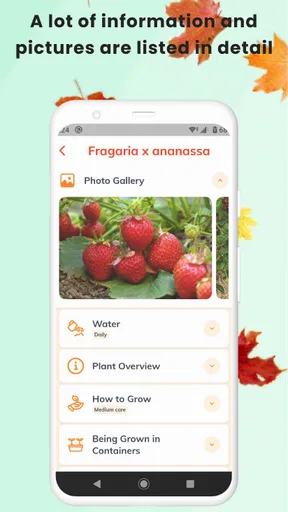
But wait, there’s more! The app doesn’t just stop at identification. It also offers a treasure trove of plant care tips. Whether you’re dealing with a finicky fern or a temperamental succulent, the app provides customized care instructions to help your plants thrive. You can even set up reminders for watering and fertilizing, so you can kiss those yellow leaves goodbye.
Exploring The Plant Database
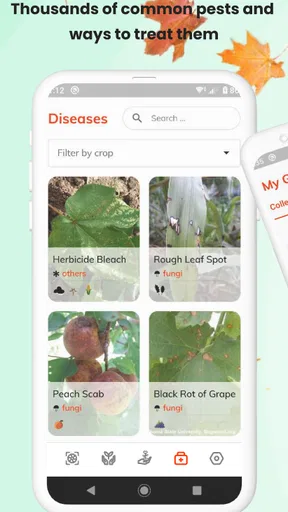
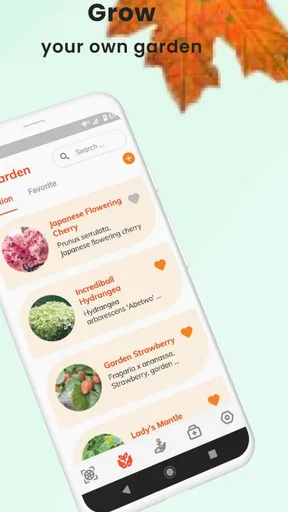
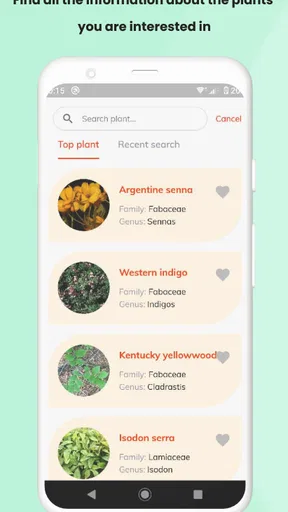
One of the most impressive features is the extensive plant database. With thousands of entries, it’s like a digital library of all things green and leafy. Each entry comes with a detailed description, care tips, and even fun facts that can make you the hit of your next garden party. Did you know that the Monstera plant is also known as the "Swiss Cheese Plant" due to its holey leaves? You do now!
User Experience
Now, let’s talk about the nitty-gritty: how does the app actually perform? In a word: effortlessly. The app runs smoothly without any hiccups, and the image recognition technology is impressively accurate. There’s something satisfying about getting quick, reliable results without having to sift through a mountain of information. Plus, it’s nice to have all this knowledge at your fingertips without having to lug around a heavy plant encyclopedia.
The app also has a social aspect, allowing users to share their plant discoveries and care tips with a community of fellow plant enthusiasts. It’s like being part of a club where everyone shares your passion for plants. Who knew plant care could be so social?
Choosing it over familiar alternatives
Compared with a general web search, the appeal here is the focused path from a plant photo to identification and care information in one app. A web search can be better when I already know the plant’s name and want to compare several independent sources, while this app makes more sense when I’m starting with an unfamiliar leaf and want a quick lead. A printed guide remains useful outdoors when a phone is inconvenient, but it cannot respond to a picture in the same direct way.
I would not make it my only reference for a serious garden diagnosis. A photo can show visible symptoms, but it cannot necessarily explain whether a leaf is damaged by watering, light, pests, or another cause. When a plant is declining quickly, I’d use the app to gather clues and then compare them with advice from a knowledgeable local nursery or a trusted horticultural source. The best role for it is often the first step, not the last word.
Making the advice useful in real routines
One practical way to use the care guidance is to change only one thing at a time. If a plant looks unhappy, checking its identification and care notes may suggest a direction, but moving it, watering it, and adding fertilizer all at once makes it hard to tell what helped. I’d first compare the plant’s current spot and soil condition with the guidance, make one modest adjustment, and observe it before trying another. That keeps a useful reference from becoming a reason to overcorrect.
For a shared balcony or community garden, the identification feature can also help people talk about the same plant consistently. A household member can take a picture, show the likely result to the others, and agree on what to monitor. The trade-off is that a shared conversation is still needed: the app may offer information, but it cannot settle who is responsible for checking the pot or whether a suggested care change suits that particular growing space.
Free to start, with a paid boundary to notice
The app is free to download, while in-app purchases range from $1.99 to $104.99 per item. I’d look carefully at any purchase screen before confirming anything, particularly if children or other household members use the same device. The range is broad enough that it is worth understanding what an offered item includes and whether it solves a real need for your routine, rather than paying simply because a plant identification is uncertain.
That does not make the app a poor choice for someone who wants to explore plant names and basic care. It does mean I would begin with the free experience and judge its usefulness for my own plants before spending. If your main goal is a one-off identification, a free search or a local gardening group may be enough; if you regularly identify plants and value having care material in the same place, the app’s format may be more convenient.
Ratings, version, and practical fit
Plant App has a 3.9 average from around 7.9K ratings, with about 278 written reviews and over 1M installs. I read that as evidence that many people have tried it, not a guarantee that every result will suit every plant or that every user will have the same experience. It is free, rated Everyone, and its current version is 2.3.5, with Android 5.0 as the minimum requirement. The app was released on September 7, 2021.
Those details help set expectations, but the more important question is whether its mix of identification and care advice matches how you garden. It is a reasonable fit for curious beginners, people who keep a few houseplants, and households that want a shared starting point for learning plant names. It is less compelling for someone who already has a reliable botanical reference, needs professional diagnosis, or expects an app to coordinate plant care between multiple people without any conversation.
When I would put the phone away
Not every plant question is best answered by taking a picture. If the specimen is difficult to reach, the photo is blurry, or several similar species grow nearby, I would avoid acting on a single result. I’d gather clearer views of leaves, flowers, and the overall growth where practical, then compare the suggestion with a second reference. If the question concerns whether a plant is safe to eat or handle, I would not use an identification app as the deciding authority.
There is also a small but real trade-off in relying on a digital guide while gardening: it can interrupt the simple act of looking closely. I find the app most useful when it sends me back to the plant with a better question—what shape are the leaves, where is new growth appearing, and how wet is the soil? Used that way, it supports attention rather than replacing it.
A household verdict on Plant App
Plant App - Identifier & Care is most appealing when a household wants an approachable way to investigate unfamiliar plants and keep basic care information close at hand. Its photo-based identification, plant reference material, and care guidance make a useful combination for people learning as they go. I’d recommend it as a convenient companion for everyday curiosity, with the understanding that reliable plant care still depends on observing the actual growing conditions.
For families, the strongest approach is simple: use it together, treat suggestions as clues, and agree on who will follow through before changing a plant’s routine. For someone seeking expert diagnosis, dependable safety decisions, or automatic coordination among several users, a specialist source or a direct household system is the better choice. If you want a friendly first stop for plant questions and are comfortable checking its suggestions against what you see, this app is worth trying.
Final Thoughts
So, is the Plant App - Identifier & Care worth a download? Absolutely! Whether you’re a seasoned plant parent or just starting your green journey, this app offers valuable insights and a helping hand. With its comprehensive identification features, personalized care tips, and vibrant community, it’s a must-have tool for anyone looking to nurture their love for plants.
In a world where we’re always on the go, having an app that combines technology with nature is a breath of fresh air. It’s like the app is saying, "Go ahead, embrace your inner plant geek!" And honestly, who wouldn’t want to?
If you’re ready to dive into the world of plant care, the Plant App - Identifier & Care is just a download away. Trust me, your plants will thank you!
Pros
- Accurate plant identification feature.
- Comprehensive plant care tips.
- User-friendly interface.
- Offline mode available.
- Regular updates with new plants.
Cons
- Requires in-app purchases for full features.
- Ads can be intrusive at times.
- Some rare plants not recognized.
- Occasional app crashes reported.
- Limited community interaction features.
FAQs for Plant App - Identifier & Care
What is the main function of the Plant App - Identifier & Care?
The Plant App - Identifier & Care is designed to help users identify plant species using their mobile device's camera. By taking a picture of a plant, the app provides detailed information on the species, including care instructions, growth habits, and common issues. It serves as both a plant identification tool and a gardening assistant.
Is the Plant App - Identifier & Care user-friendly for beginners?
Yes, the app is designed with an intuitive interface that is accessible for beginners. It features easy-to-follow instructions and guides users through the identification process step-by-step. Additionally, it offers care tips and reminders, making it an excellent tool for those new to plant care or gardening.
Does the Plant App - Identifier & Care require an internet connection?
While the app can perform some basic functions offline, an internet connection is generally required for accurate plant identification and accessing the full database of plant care information. Users are encouraged to connect to Wi-Fi or use mobile data for the best experience and up-to-date information.
What type of plants can the Plant App - Identifier & Care identify?
The app is capable of identifying a wide range of plant species, including indoor plants, outdoor plants, flowers, trees, and succulents. It draws from an extensive database, allowing users to identify both common and exotic species. However, accuracy may vary based on image quality and plant condition.
Are there any costs associated with using the Plant App - Identifier & Care?
The app typically offers a free version with basic features. For more advanced capabilities, such as detailed care guides, personalized tips, and an ad-free experience, users may need to upgrade to a premium subscription. Pricing details and subscription options are available within the app.


